Author: Nic Raboy
Native To Hybrid And Back Again
 September 22, 2017
  Nic Raboy
I was recently attending NativeScript Developer Day 2017 in New York City, which is Telerik's very own NativeScript conference.
This was a fantastic conference where I was not only a participant, but also a speaker at the event. At this event I had given a fresh presentation titled, Native to Hybrid and Back Again, where I had discussed my own personal experiences when it came to mobile application development.
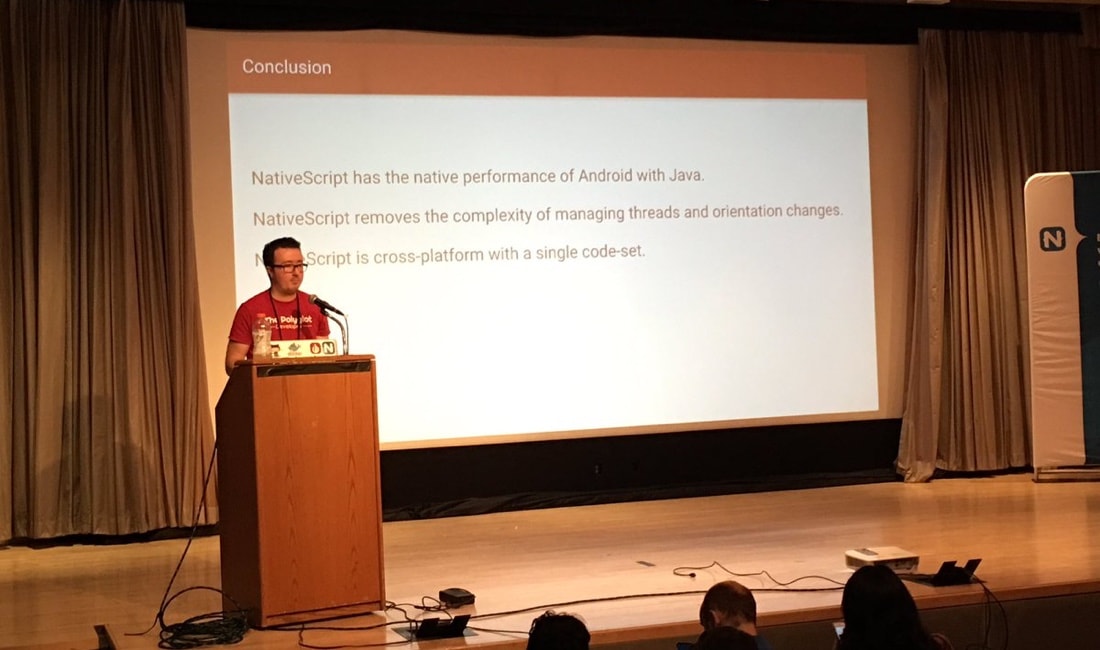
I want to take the opportunity to summarize what I discussed during this event and share the slides that went with my presentation.
Read MoreUse Google Analytics In A NativeScript Angular Application
September 18, 2017 Nic RaboySo you've spent time creating an awesome mobile application, but how do you know how it is performing in each of the available app stores? How can you gauge the user interactions with your application to better improve what you've built? The easiest way, and in my opinion the best way, would be to incorporate Google Analytics. With Google Analytics we can track application events, screen views, and other things without leaking any identifiable information about the user.
We're going to see how to include Google Analytics in our Android and iOS mobile application built with NativeScript and Angular.
Read MoreThe Polyglot Developer Has A New Look
September 12, 2017 Nic RaboyBack in 2014 I started The Polyglot Developer on WordPress with the intention of documenting what I learn and helping others in the process. However, back then, it was not called The Polyglot Developer, but instead Nic Raboy's Code Blog. The blog was later rebranded in early 2016, but the look and feel stayed the same.
I am pleased to announce the new version of The Polyglot Developer and a few important things that have changed with this version 2 release.
Read MoreGetting Familiar with Gulp for Workflow Automation
September 7, 2017 Nic RaboyI've been developing web applications for as long as I can remember and there are certain repetitive tasks that I do between the development and deployment of each final product. For example, current web standards demand that web resources like CSS, and JavaScript be minified or images be compressed. We could easily do this by hand or with helper applications, but why would you want to?
Instead, repetitive tasks can, and should, be transformed into an automated workflow, something that is particularly useful when it comes to continuous integration and continuous deployment.
We're going to see how to create a an automated workflow using the Gulp toolkit to do simple tasks like cleaning, minification, copying, altering, and even deploying projects.
Read MoreUnit Testing a Node.js Application with the Jasmine Testing Framework
August 24, 2017 Nic RaboyWhen building an application, regardless if it is mobile, web, or neither, it is a good idea to come up with a collection of tests that can be used in a continuous integration scenario. I must admit, I don’t have the best habits when it comes to writing tests, but I’m sure my applications would be significantly better if I did.
Previously I had written about unit testing in Golang as well as unit testing in NativeScript with Angular. This time around it makes sense to talk about writing tests in Node.js, another technology that I have in my tool belt.
Read MoreRequest Android Permissions In NativeScript Using Angular
August 7, 2017 Nic RaboyWith every version of Android comes more security measures dropped into place. For example, in Android 6+ the user needs to grant permissions when doing certain activities, such as using the camera. These security measures are more aggressive than the previous form of asking permissions in the manifest file.
So what if we want to prompt the user to grant permissions at a time other than when trying to use the feature that requires the permissions? For example, asking for camera permissions when the application loads, rather than when we try to use the camera feature of the application?
We’re going to see how to request permissions in an Android NativeScript project with Angular.
Read MoreTPDP Episode #15: Authorizing Access with OAuth
August 2, 2017 Nic RaboyI am pleased to announce that the latest episode of The Polyglot Developer Podcast is now available to download from all the popular podcasting networks. In this episode titled, Authorizing Access with OAuth, I’m joined by Ryan Chenkie from Auth0 to talk about OAuth and how it can be used to authorize access to your data by third-party applications.
Episode #15 can be downloaded for free from iTunes, Pocket Casts, and every other popular network, but it can also be heard below.
Read MoreSearch
Follow Us




Recent Posts
- Resty Desktop, a GUI for the Restic Backup Application
- Test Password Strength and Password History with TypeScript and MongoDB
- Extract Text from Your PDF and Image Files with Apache Tika
- How to Install MongoDB on Ubuntu: A Step-by-Step Guide for Beginners
- Running MongoDB in Docker - A Complete Guide with Examples
Support This Site
If you found this developer resource helpful, please consider supporting it through the following options: